Final Decisions & Research
- Mikey Owen
- Jan 31, 2023
- 11 min read

After brainstorming some ideas at the end of my previous post, I've reached some conclusions about the design of my final cinematic.
I'll break these down into the sections I used previously: Environment, Effects & Software choices. From there it's imperative that I begin some research and concepts ASAP to avoid any delays in the production of my final piece.
Environment
From the environment options I discussed in the last post, there was one option which clearly stood out to me as something I'd like to make (and in turn would be most enhanced by the smart application of visual effects): The grim/dark fantasy, Gothic, sci-fi cathedral interior.
I've been consuming a lot of media recently of this genre, so have a broad example of research material to choose from when creating concepts for my environment. I've actually compiled a list below of influences which immediately stood out to me:
Warhammer 40,000
Gears of War
Arcane
Judge Dredd
Gotham City (Batman)
Bloodborne
The Dark Tower
The Lord of the Rings (Moria specifically)
Bladerunner
Frankenstein
Alita: Battle Angel
As you can see from the list above, there's a wide range of video games, comics and movies to choose from, each with their own take on the genre. It's from these examples I've compiled below a gallery of reference images that I can use to influence my own design:




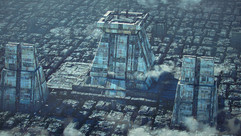





As you can see from the above gallery, there's a plethora of varying takes on the genre and general design of an environment like this in existing media. However the overall darkness and blend of sci-fi with Gothic architecture makes up the skeleton of every single one.
While I could simply leave the above gallery as it is to serve as an implication of the time spent studying this aesthetic; I feel it would be much more beneficial to select a few chosen images and discuss what I like about them, as well as what elements I could incorporate into my own environment:

This reference image here (which is an example of some concept art from the video game Bloodborne) perfectly encapsulates the look I'd like to achieve from my environment. The Gothic church interior, with candles dimly lighting the gloom and mist swirling around the floor.

This image (concept art from Warhammer: Darktide) also shares the dark aesthetic of the previous one, but I really love here how the small gaps of light in the ceiling allow rainwater to fall down into the middle of the room. Collecting on the geometry of the environment and giving everything a cold feeling to it.

This third image (concept art from Gears of War) furthers what I stated about the previous one. The single light source by way of the hole in the ceiling perfectly frames the center of the image. I hope to be able to use lighting this effectively when it comes to producing my own environment.

This shot (taken from the comic Alita: Battle Angel) shows that perfect mix of old architecture with modern technology props that I hope to achieve with my own environment. The thick, old concrete walls hold a suspiciously modern inside, littered with monitors, neon lights and all sorts of electronics.
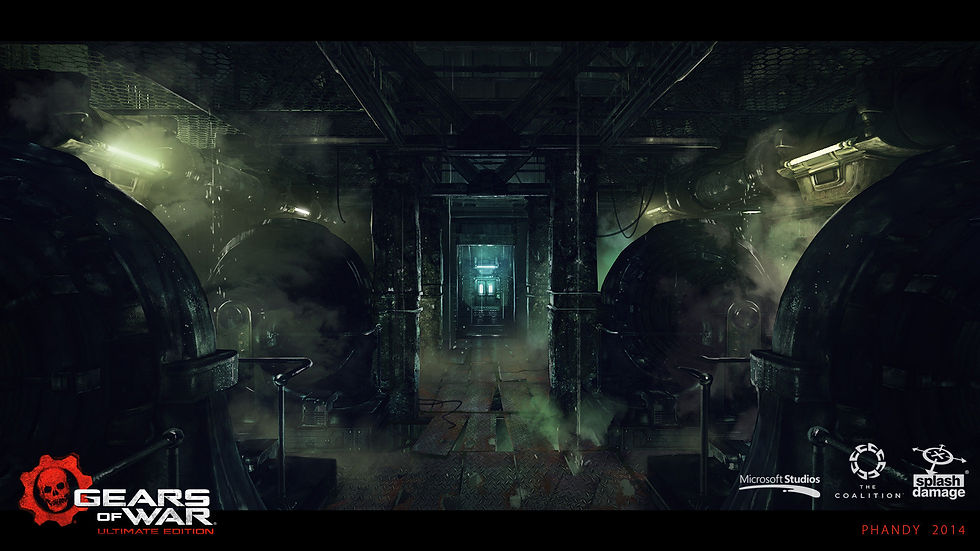
Another image taken from Gears of War, I love the industrial look of this scene. The layout of the room is distinctly a vast warehouse which is at odds with the church I want to create. But its the mist and lighting of the big industrial machines that draws me to it. I'd love to include something like this in my scene.

Lastly we have this concept art (taken from the animation Arcane). It may not focus on an interior environment, but I plan to give my church large windows with some semblance of a larger city visible outside it's walls. I'd ideally love to replicate this look of a claustrophobic, large, grimy industrial network of buildings.
That brings me to the end of my environment study. I believe I now have a fairly concrete idea on how I want my final scene to look, but before I can begin concepts it's necessary to finalize my decision on what effects I'll be using. Once they're in place I can use them to aid the lighting and framing of the concepts I'll create, especially given that they will be the main focus of the final cinematic.
Effects & Concept
When I began writing this post, I was fairly certain I knew exactly what effects I was going to produce for this assignment. However, following my research into environments above, I've had a change of heart, particularly when analyzing my reference images.
I've decided to go with 3 (technically 4) effects for my final scene. Which I've broken down below:
Fire & Smoke - The most common of CGI visual effects, but when used effectively also the most integral to a scene. This will act as both an effect to fit the criteria of the brief and also part of the lighting solution for my scene. I intend to have several candles scattered throughout my church environment, some lit, some not, some new, some almost burned out. Additionally, I intend to use large braziers hanging from the ceiling to be a primary light source for the wider environment as a whole. From these I will have larger flames with plumes of smoke and embers. This way this effect can serve as a two fold for both fire & smoke systems, and I'll need to study how I can make these effectively given I'll need two different sizes of each (small for candles, large for the braziers).
Water Systems - This one I'm sure even at this early stage will present the most challenge. I've dabbled in water systems before, and have always found my attempts lacking. However, this will be the primary effect for my final cinematic. I'd like to implement a large hole in the ceiling, with a torrent raging on outside. This way I'll need to implement a rain system with collision data so it only falls through the gap in the roof. Additionally I'll need a small waterfall to show the water collecting on the roof flooding down into the room below. This water will then need to impact with the debris on the floor and collect in puddles, which also means adjustments will need to be made to the materials and collision data for the flooring. This will certainly be challenging, but if I can achieve it, it will tie the whole cinematic together.
Sparks - This effect on paper should be (I hope) quite easy to implement. This will be a simple particle effect of electric sparks shooting off from the various computer equipment around the scene. I'll need to randomize these, as well as adjust the lighting of the machines to synchronize with the sparks to show the power dipping in and out. This, like the fire, will also be a part of the scene lighting. Having some nice electric blue contrasting to the orange of the flames and white of the moonlight outside.
Mist/Fog - While I'm including this effect here because it does technically count as one, it will not really warrant any research into effect creation nor affect my final software choices. This is because I have plenty of experience producing these effects, and simply wish to add them to enhance my final cinematic. I'll create them using the inbuilt volumetric systems of Unreal Engine 5, then tinker with the settings there until my scene looks sufficiently gloomy. I may explore other options should I discover anything more suitable during my research for the other effects, but as I said this one will not be a priority.
That's all for my effects! I'm hoping there's enough here to really enhance my environment, but not too much that I end up having to remove any. Now that I have a firm idea of how I'd like my final scene to look, I'd really hate to have to compromise on anything. I'm sure if any decisions like that will be necessary it will become apparent later in this post when I begin researching the software options available to me. But for now, I'd like to move onto drawing up a concept for my environment which I can then later adapt into a 3D layout.
I've therefore created the concept below to try and get my initial ideas for my environment into a visual representation:

You'll note I've used grey scale for the concept. This is because I the main thing I wanted to establish with this concept was the placement of the visual effects and how their lighting would affect the environment.
I think perhaps more candles should be littered about the scene as they will be the primary interior light source, but I'm definitely pleased with the placement of the hole in the ceiling. I think the rain falling through here and running down the statue will be a great effect! Though I'm not sure if I've gone slightly overboard with the sparks. Given that they will be randomly going off throughout the cinematic, perhaps a less is more approach would be best to avoid distracting from the other effects. But other than that I feel this is a strong concept to proceed with. I think the mix of the Gothic architecture with the large pillars, statues and stained glass windows contrasts well with the mechanical flooring, sci-fi neon lighting strips, and various industrial machines and props dotted around the environment. I think the mist running across the ground will also go a long way with enhancing the foreboding atmosphere of this church! The light of the effects bouncing off of it should create that dark sci-fi feeling that I'm striving to achieve.
Now that I have a strong concept to proceed with, I can move onto researching the software options available to me to produce my effects.
Software Options
Now we come to the final element of this post before I can begin plotting out a 3D layout and ultimately creating a pre-visualization for my final cinematic: the software options I will use to construct my visual effects.
When I began this blog post, I had a very clear idea about how I was going to set about making the decisions around which software I would use: research into each effect to discover what software it was possible to create it in, then narrow that down to the three most effective choices (based on a mixture or tutorial consumption and user feedback) for each effect. Unfortunately, during this process I made several discoveries which ultimately resulted in this approach being impossible.
Take my fire and smoke effects as an example. I discovered these were entirely possible within Niagara, Embergen, Maya, Cinema 4D, 3Ds Max, Blender, Houdini, Nuke & After Effects. There's plenty more options sure, but these are the ones I highlighted in the previous post. I watched a tutorial for creating fire in each software platform, and they all seemed relatively straight forward. However, I then decided to look into the workflow process for exporting the fire effects from the respective software options into Unreal Engine (given that my environment and final animation will be produced here). This is where things unfortunately fell apart.
Aside from Niagara (obviously as it's a particle system within Unreal Engine) and Embergen, every other option had no concrete way to export particle, liquid etc effects into Unreal Engine. I scoured forums, videos and reviews trying to find a solution, but every single one advised to simply replicate the effect using Unreal's built in particle system (either Niagara or Cascade, it's older brother from Unreal Engine 4).
As I'm sure you know with my approach to these assignments, I don't like to take the word of others as concrete until I've attempted it myself. I therefore completed some experiments with Maya, creating the most primitive of particle effects, and attempted to export it as an alembic cache (something I'd developed a workflow with from my clothing effects last year). This unfortunately didn't work, as the particle system within Maya wasn't actually creating an animation in the same way that it does with geometry. Unreal imported the cache, but ultimately it resulted in a blank actor with no data. The only way I could see this being possible would be to render the animation with Maya using Arnold, ensuring there was an alpha background, then compositing the sequence over my final animation sequence in post production. This immediately seems impractical, not only because of the enormous render times required to render a full particle system with Arnold, but also because of the need for precise camera matching between Maya and Unreal. If the camera perspective from each is even slightly off, I would either need to manipulate the effect into position (which would impact the quality of the effect, not to mention there would always be an element of 'jank' because it would never sit perfectly right), or render the effect again and dealing with yet more render times.
Another example was liquid effects within Blender. I love Blender as a software option (especially given that it's free), but unfortunately it shares the same issues. I produced a very simple liquid effect, located a vague guide online which described how to export it to Unreal, then about halfway through I realized what this process was doing. It converted the liquid from a fluid based system into actual geometry. This resulted in the final result being a blocky, low poly mess with missing texture information.
I hope via this section, you can understand why I've made the decision to ultimately choose 3 software options in totality, regardless of effect. I will attempt to create each effect in each option, but can already take an educated guess at which will be the most suitable: Niagara. Having the effects be created within Unreal just skips so many potential headaches. Regardless, I'm hoping to be surprised by the other options! I'll detail them all below with my initial findings:
Niagara - This will probably be the default option for most of my visual effects given that it's Unreal Engine's built in particle system (information on Niagara can be found in the official Unreal Documentation here). While I've not made effects before within the system myself, I have used pre-made fire assets from the Unreal marketplace before which were built within it, so I know at least one of them is possible! Additionally there is a Niagara fluids plugin available within Unreal Engine which should work perfectly for my water effects, and the default particle system has plenty of facilities available to make sparks/electric bolts (judging by the plethora of tutorial options I've discovered detailing the creation of just that!).
Embergen - This is an effects package which has only been brought to my attention recently by an ex student (a link to the official site can be found here). Embergen is a visual effects software created by JangaFX which has been "specifically created with games in mind" so already the exportation of my effects to Unreal Engine should be simple. It has the ability to export fully rendered flip book, and provides instant real-time feedback when changing the multitude of options within the editor. The software has been built specifically for fire and smoke effects, so is an obvious contender for this visual effect. Though currently it doesn't allow for the creation of water (JangaFX do have Liquidgen releasing later this year though), it should work well enough for the sparks and bolts given that it's used to create 'magic' particles. JangaFX even allow a 10 day free trial of the software which should be plenty of time to create the effects I need and conduct sufficient experimentation.
Adobe After Effects - This one is a bit of a wild card, as rather than producing in-engine visual effects that I can add to my environment before rendering the final sequence, I will actually need to create the animation first and add them in post. I chose After Effects (a link to Adobe's official After Effects page can be found here) for exactly this reason. It will be a completely different way of approaching visual effects production and thus will have far more varied discoveries from it. I've used After Effects for post-production in the past for things like colour correction, exposure adjustments and chroma keying a green screen, but never for full visual effects creation. I've looked into a wealth of tutorials and information, and the effects certainly seem possible (particularly the fire and the mist), though the water may be a challenge. I do have concerns about using the track-motion facility though. While it's incredibly intuitive, it's never quite perfect. So essentially if the camera moves during my final animation, the effect will have to perfectly move with it to avoid breaking immersion. This is probably something worth exploring further during the effect's creation phase. At the very least, After Effects will be integral for the post-production phase of this assignment, and if it doesn't end up being the main contender for the effect's creation, it will still be able to enhance them in some way.
That brings us to the end of this post. I have my environment planned out, I have my effects decided on, and the software I will be creating them in confirmed. This phase of the assignment took far longer than I expected, but I believe with the thorough research I performed here my final animation (and the ease with which I will be able to construct it) will be vastly improved. In the next post I'll begin blocking out my environment in a 3D space in Unreal Engine 5, then adding some basic effects to plot out their final placement, before constructing a previsualisation to cement the camera movements/angles/lens types/apertures for the final piece.


Comments